Word Search Solver
Scan a photo of your puzzle or type it in, and every word is marked as you go.
How do you want to start?
Scan a photo of the puzzle, or type it in yourself.
How Word Search Solver Works
Word Search Solver finds the words in a word search puzzle. Add the words you are looking for and each one is marked where it appears, in all eight directions and at every position. A word the grid does not contain gets a cross instead.
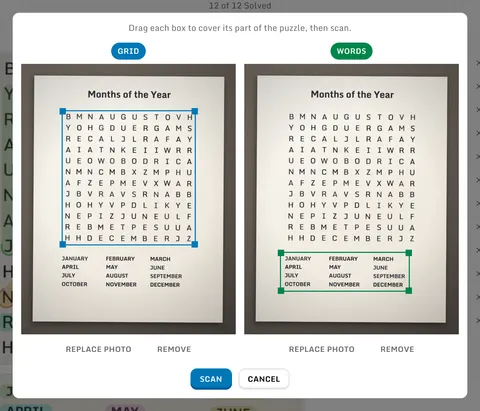
A photo is scanned for you. Give it the whole page and the grid and the word list are detected, scanned, and marked; if that fails, you drag a box over each part and scan again. The two scans are cross-checked, so a letter the camera missed is often corrected by the word it belongs to.
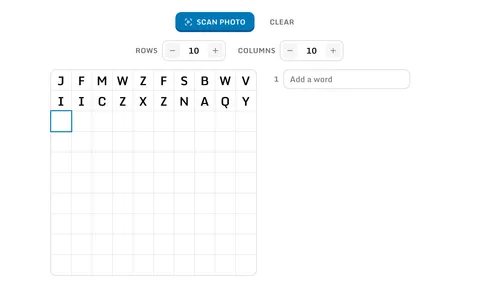
Typing it in works too: set the rows and columns, type across the grid, or paste the letters in as text and the grid grows to fit them. A word list pasted into the words is split on lines, tabs, and commas into one word per row.
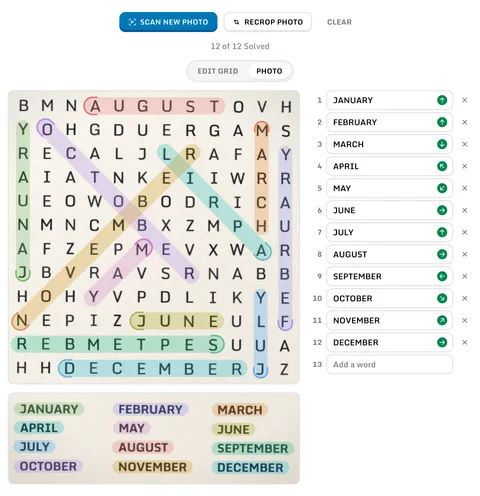
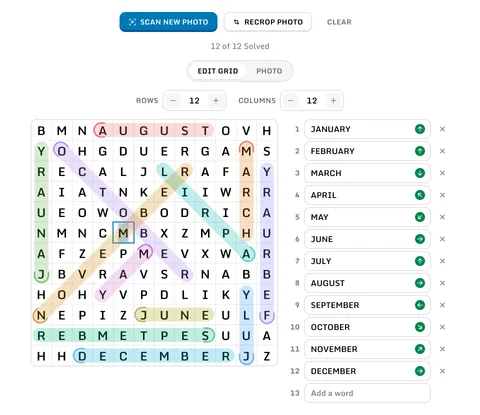
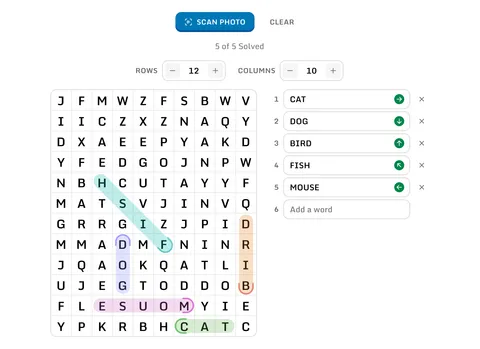
Each word carries an arrow for the direction it runs, or a count of its matches if it runs more than one way, and a line above the board counts how many have been found. Hover a word to bring its matches forward, or click it to keep them highlighted. The marks can be shown on your photo as well as on the grid.
It is free and there is nothing to install. The photo is scanned and the puzzle is solved in your browser, so no picture and no puzzle is sent anywhere.
Solve a Word Search From a Photo
- 1
Press Scan Photo and pick a photo of your puzzle, or drag one onto the page.

- 2
A photo showing the whole puzzle is scanned right away and every word is marked on it. Usually that is all you need to do.
- 3
If a part could not be detected, crop boxes open over the photo instead. Drag each one onto the grid or the word list, then press Scan.
- 4
Type over anything the scan got wrong. Recrop Photo lets you adjust the boxes, and the Grid and Photo tabs show the marks on the board or on the photo.
Type or Paste the Puzzle Yourself
- 1
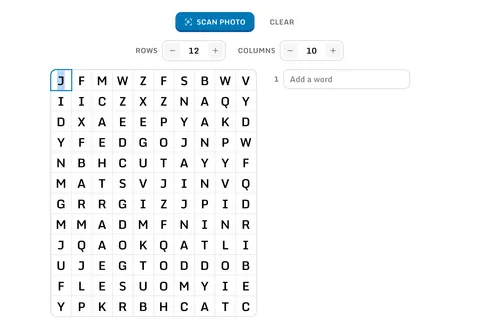
Set the number of rows and columns, up to 50 each, then type the letters into the grid. Arrow keys move between cells.
- 2
Already have the puzzle as text? Paste it straight into the grid and the grid grows to fit. A word list pasted into the words is split into one word per row.
- 3
Add the words to find on the right, one per row. Matches are marked in the grid as you type.
Frequently Asked Questions
- ?Which directions does the solver search?
- All eight: left to right, right to left, top to bottom, bottom to top, and all four diagonals.
- ?What do the marks beside a word mean?
- An arrow pointing the direction the word runs in the grid, a count of its matches if it runs in more than one direction, or a red cross if the grid does not contain it. The line above the board counts how many of your words have been found.
- ?How do I pick out one word?
- Hover it in the list and the rest are dimmed. Click it to keep it highlighted while you look at another, on the grid and on the photo alike.
- ?Does capitalization or punctuation matter?
- No. Letters are matched case insensitively, and spaces, hyphens, accents, and punctuation are ignored, so "O'Hare Airport" matches OHAREAIRPORT in the grid.
- ?What if a word appears more than once?
- Every occurrence is marked at once. A word that appears only inside a longer word on your list is left to the longer one, so the RAIN in RAINBOW is not marked twice.
- ?What makes a photo scan well?
- Hold the camera square to the page, keep the letters in focus, and fit the whole grid or word list in the frame. Printed English letters scan best; handwriting scans less accurately.
- ?Is my puzzle uploaded anywhere?
- No. The photo is scanned in your browser and the solving happens there too. Your puzzle photo is never sent to a server.